Create the image thumbnail for the InDesign plugin
In Pimcore, create an image thumbnail named FactoryInDesign (exact spelling and capitalisation). The plugin needs this thumbnail to display asset previews and insert assets from its ASSETS tree.
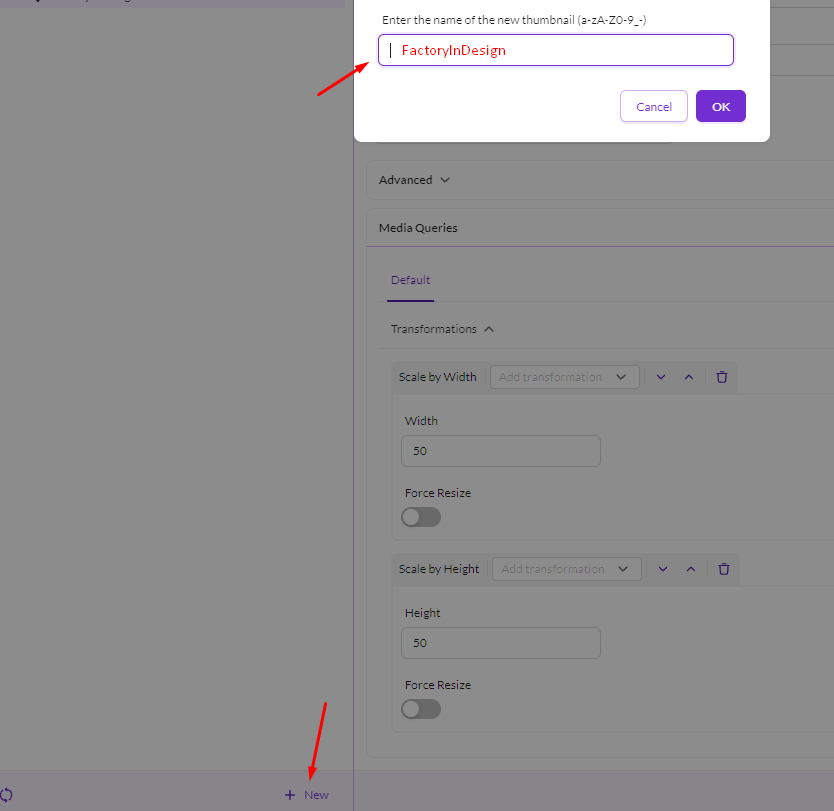
Configure these transformations for the thumbnail:
1. Add Scale by Width and set Width to 50.
2. Add Scale by Height and set Height to 50.
3. Save the image thumbnail.

Both transformations and the exact thumbnail name are required. If assets are readable in Datahub and the relevant asset folders are included in Security Definition > Workspaces, but assets still do not appear or cannot be inserted in the plugin, ask the Pimcore administrator to verify this thumbnail configuration as well.