
Designers stay in InDesign
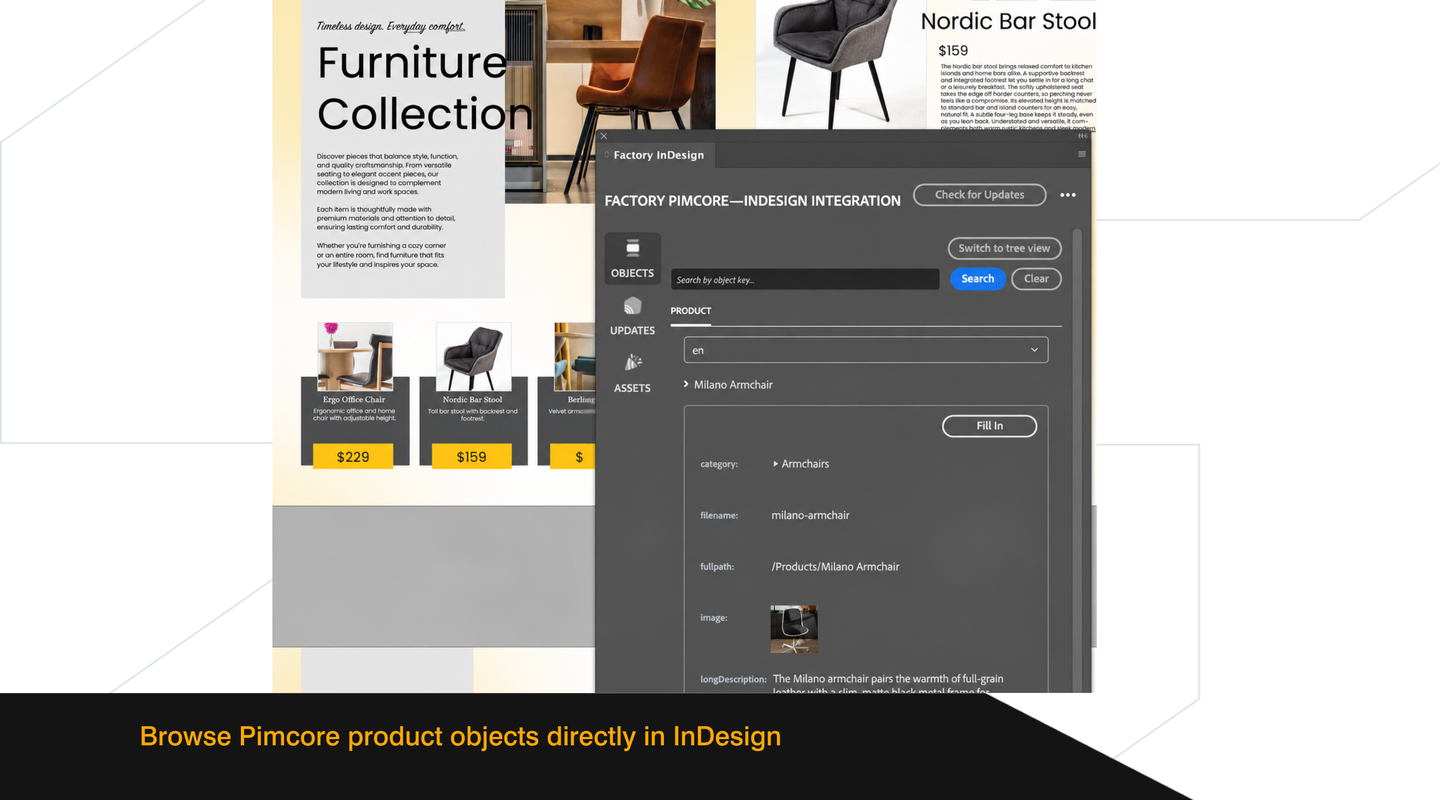
Browse products by class or in a tree that follows the Pimcore hierarchy. Search and filter exposed objects, including related product information, without opening the Pimcore admin.

Design catalogs, packaging, technical product sheets, and other digital or print publications in Adobe InDesign with product content and visuals pulled directly from Pimcore.
Request a demoFactory’s integration lets designers use product data and images from Pimcore in their own Adobe InDesign layouts for catalogues, brochures, packaging and technical sheets. When preparing a catalogue page, a designer can select a product in the InDesign panel and place its price and image in the layout. If the price changes in Pimcore before the catalogue goes to print, the designer can check for updates, review the new price and apply it to the page.
Factory and Pimcore explain why a late product update can hold up a catalogue. See how designers handle changes in InDesign and when automated PDF generation makes sense.
Watch the recordingThree steps that repeat for every page and edition.
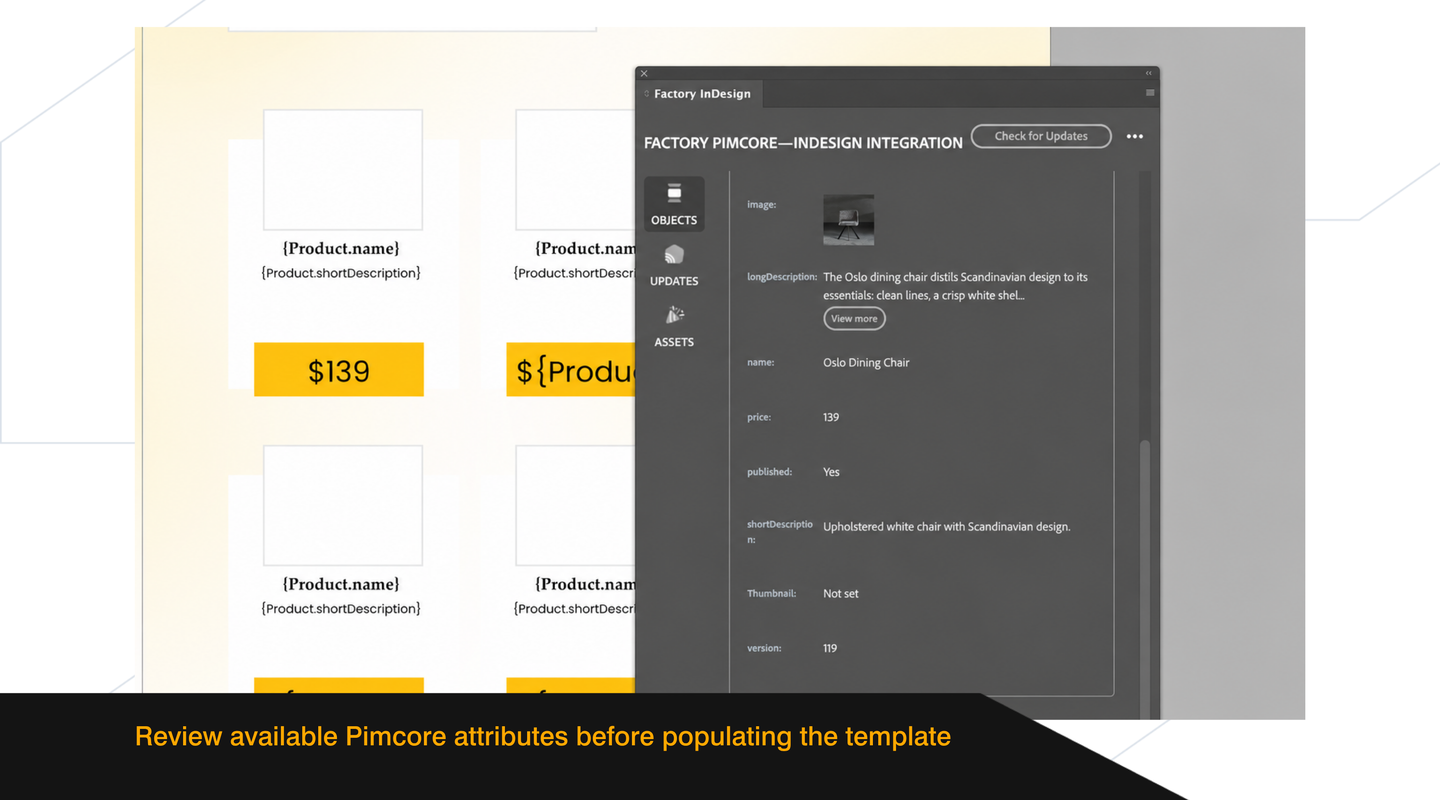
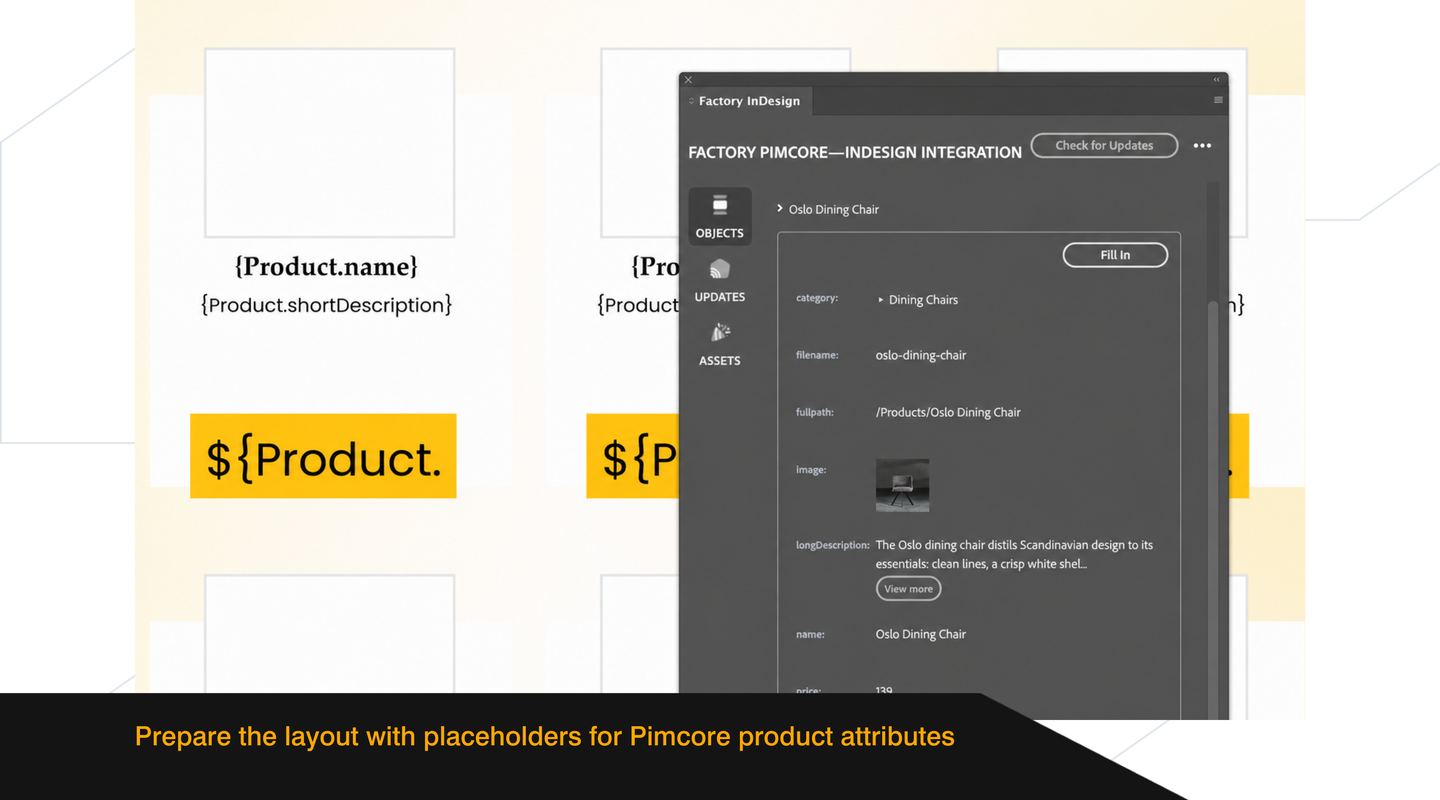
You add placeholders such as {Product.title} to text frames in your layout.
You select the frames, choose a product in the panel and fill them. Images go into the frames you select.
When data changes in Pimcore, you check the document, review the changes and apply one or all.
Try the three steps yourself: fill a catalogue page from Pimcore, change the product, then review and apply the update.
Pimcore · Product#10-4417


{Product.title}
{Product.description}
InDesign · Factory panelEN
Four frames are ready. Click Fill In in the Factory panel.
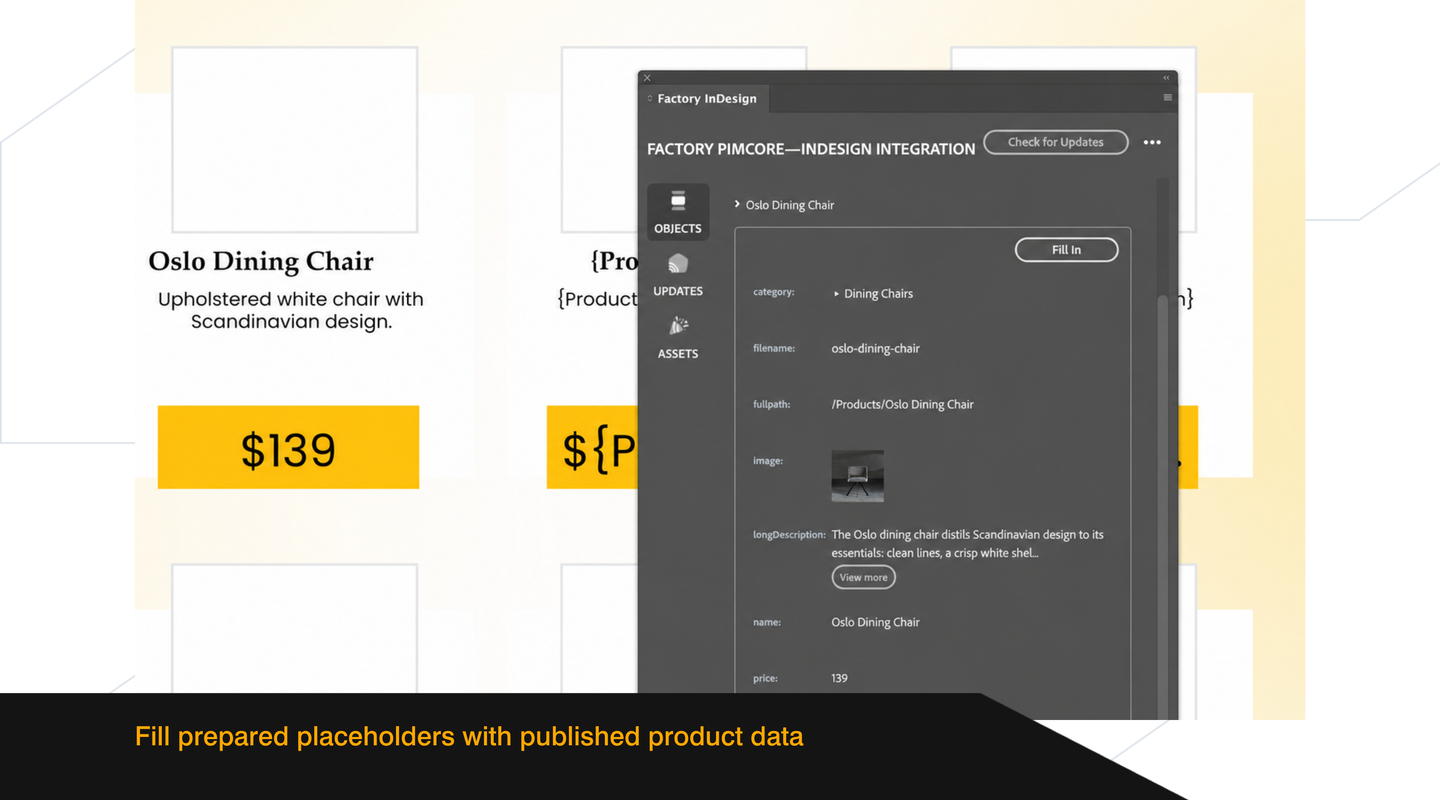
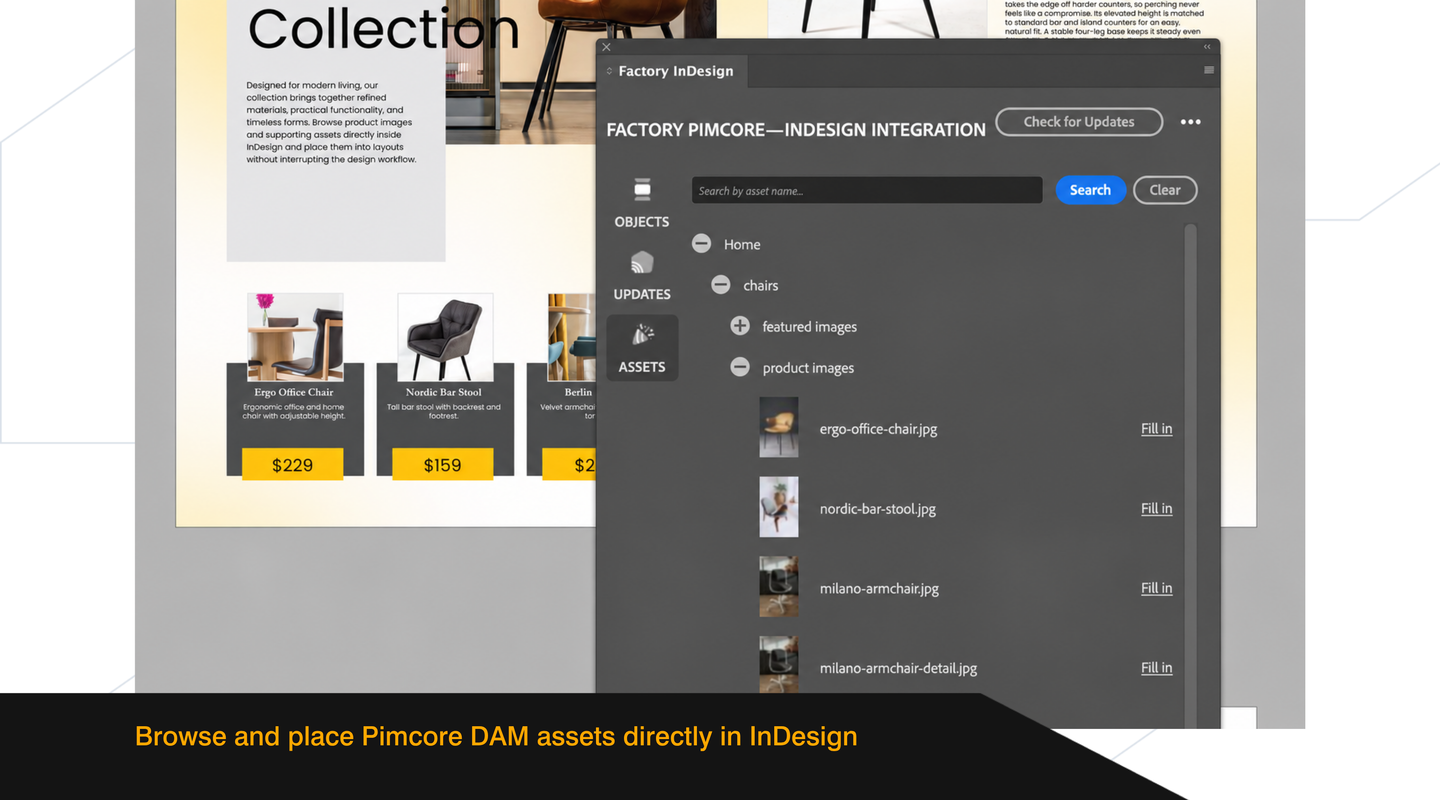
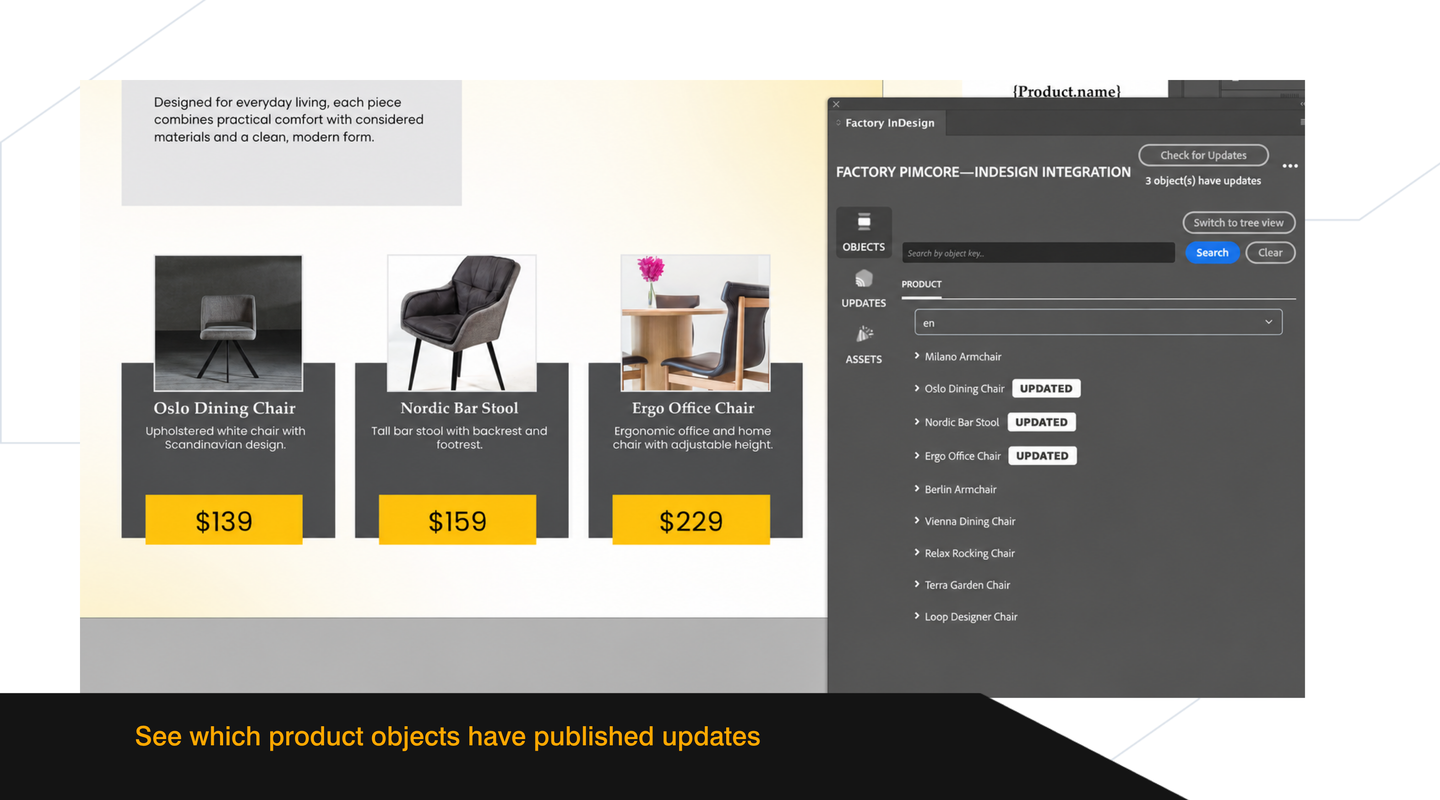
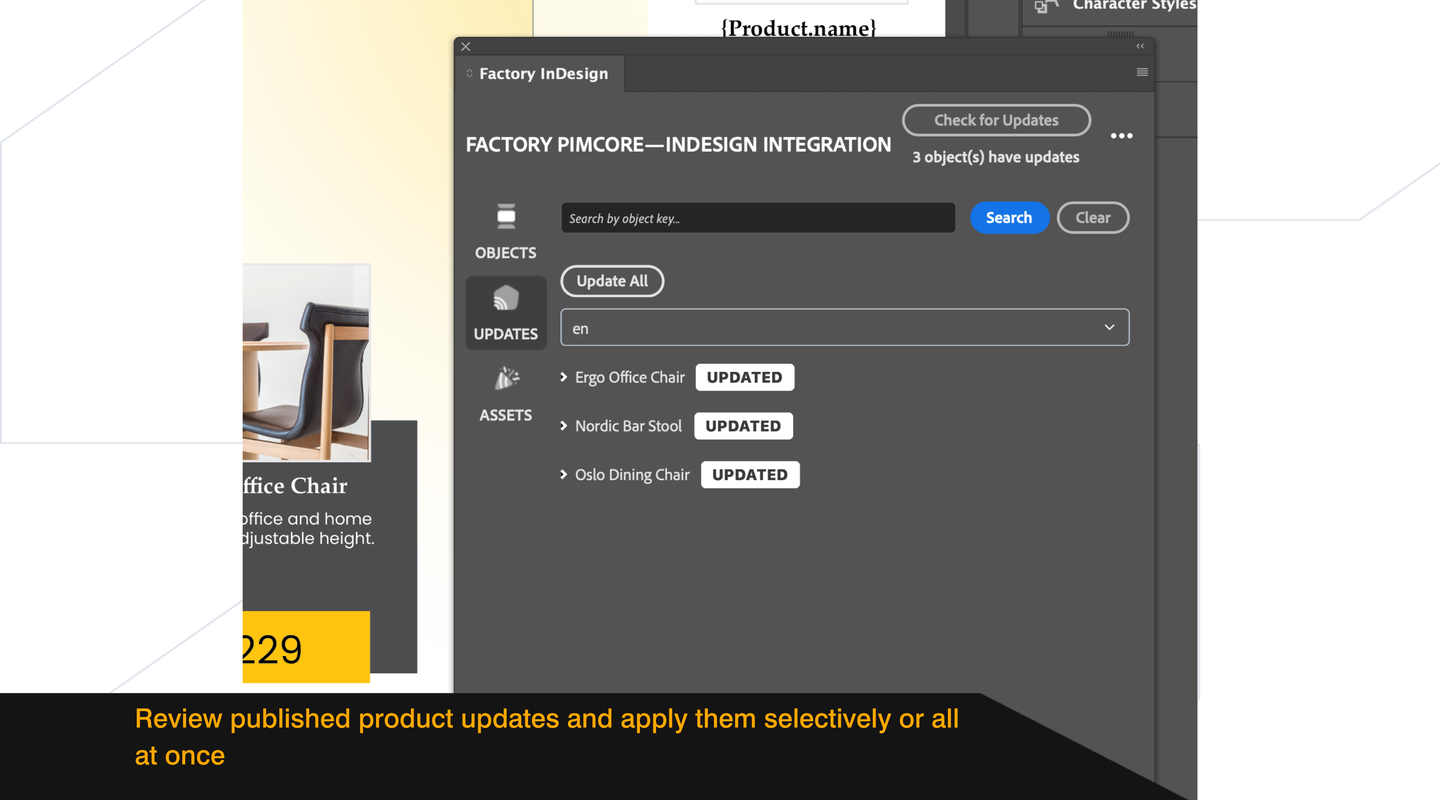
The bundle connects the InDesign plugin to your Pimcore. Here is what that means day to day.
Browse products by class or in a tree that follows the Pimcore hierarchy. Search and filter exposed objects, including related product information, without opening the Pimcore admin.
Designers keep full control over layout, styling and final output. Combine fields and custom text in existing template frames. Add static text before the first fill; imported formatting uses your InDesign styles.
The content language comes from Pimcore. You fill the same layout for each market you manage there.
Before the next print run, you check the document against Pimcore. Old and new values are shown side by side, and you apply the updates you choose without touching the surrounding layout.
Preview asset thumbnails and place images from Pimcore DAM or product relations directly in your document.
Fill prepared frames from Pimcore instead of copying names, descriptions and prices into every page by hand.
Use centrally managed Pimcore content in the publications your team produces.
Prepare seasonal catalogues, price lists and promotional brochures using product content and visuals from Pimcore.
Place specifications, variants and engineering visuals into technical data sheets, catalogues and product documentation.
Use ingredient lists, dosage details and approved product text stored in Pimcore for multilingual layouts across markets.
Discuss your templates, data model and publishing process with Factory to assess configuration or custom extensions.
Pimcore supplies the published data. Designers choose what to place and update in InDesign.
Installed through Composer, the bundle handles configuration and licensing. Pimcore DataHub GraphQL defines which classes, objects, fields and relations are available through each API key.
Designers browse products and DAM thumbnails, fill templates and review changed content in the Updates panel. Connection settings are managed inside InDesign.
Use your existing classes and relations, including classification stores, field collections and object bricks. Paginated data retrieval supports browsing exposed objects.
Work with JPG, PNG, TIFF, PSD, PDF, AI and EPS files from Pimcore DAM.
In the demonstration we walk through InDesign Integration on a Pimcore setup like yours. We focus on the work you want to improve and answer questions about your workflow.
Request a demoIt connects your Pimcore product data and DAM assets to Adobe InDesign through a Pimcore bundle and an InDesign plugin. Designers fill their own layouts and review product changes before publishing.
Teams that manage product information in Pimcore and create catalogues, packaging, brochures, price lists or technical data sheets in Adobe InDesign.
No. Designers browse products, fields and images inside InDesign. An administrator configures the DataHub connection and the data available to the plugin.
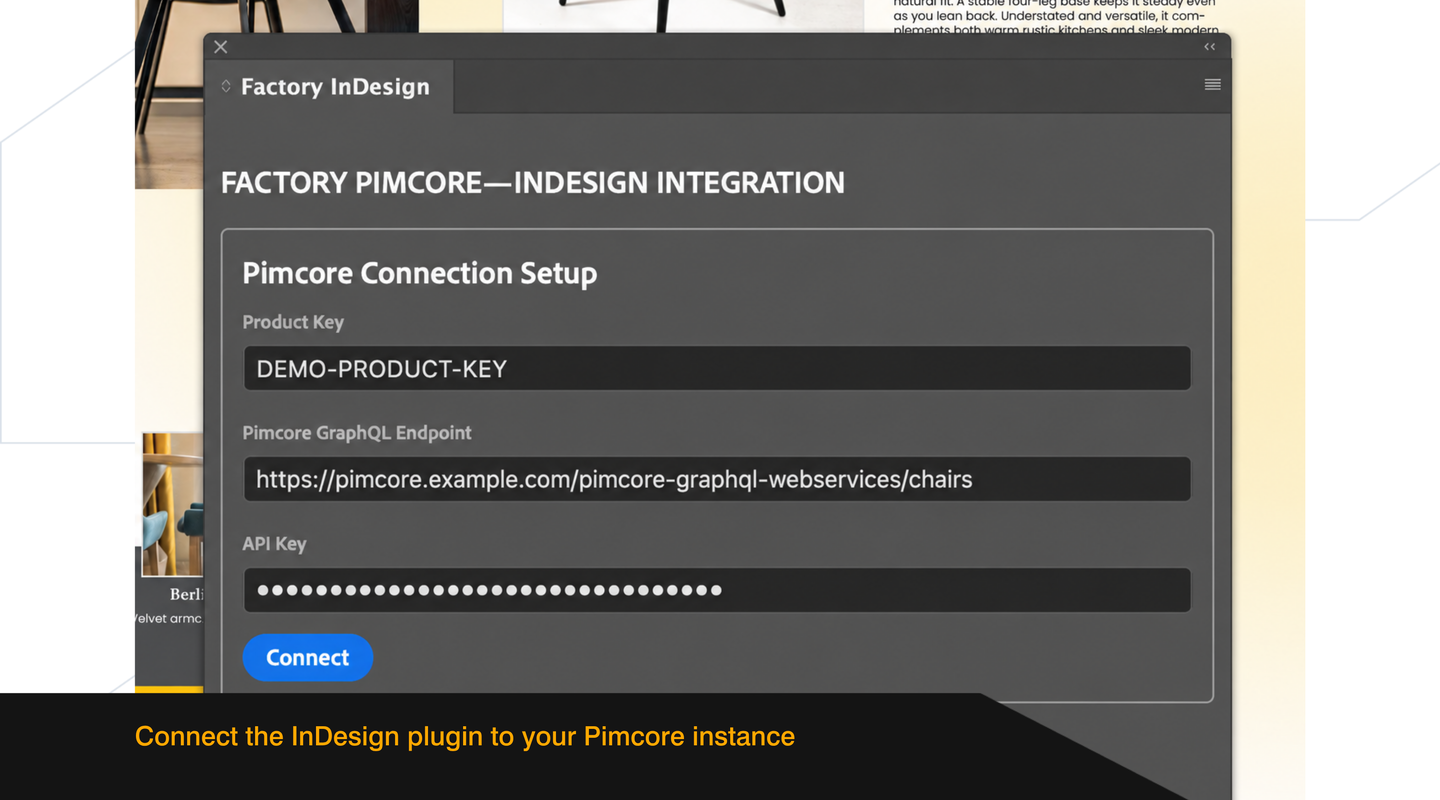
Enter the product key, DataHub GraphQL endpoint URL and API key in the plugin settings. Credentials stay on that computer and do not travel with the INDD document. Configure the connection again when opening the document on another computer.
An active connection to your Pimcore instance is needed to retrieve product information, assets and updates.
A Pimcore Commercial Licence, Adobe InDesign 20.5 or later, a configured Pimcore DataHub GraphQL endpoint and the Factory bundle installed on your Pimcore instance. See the compatibility table for supported Pimcore versions.
Yes. Add placeholders to your existing text frames. You can combine several Pimcore fields and custom text in one frame. Add the custom text before filling the frame for the first time. Designers retain control over layout, styling and positioning.
No. Data flows from Pimcore to InDesign. Edits made in InDesign are not written back to Pimcore.
Run Check for updates in the panel. Review old and new values, then apply selected changes or update all. Updates are checked when you request them.
Yes. Manual edits do not remove the connection to Pimcore, and future Pimcore changes can still be detected. Applying an update replaces manual edits to linked content. Add any custom text you want to retain before populating the frame for the first time.
Formatting from Pimcore is carried into InDesign. Designers can adapt the InDesign styles used for the imported text.
The languages configured in Pimcore. Choose the content language in the panel before filling your layout.
Products lets you browse exposed objects by class or in a tree, search and filter, and access related data. Updates shows product changes. Assets provides DAM folders and thumbnail previews. Settings manages the connection and plugin information.
JPG, PNG, TIFF, PSD, PDF, AI and EPS.
Yes. The panel reads the data exposed by Pimcore DataHub, including your own classes, relations, field collections, object bricks and classification stores.
Yes. Configure the classes, objects, fields and relations exposed through DataHub GraphQL. Related objects and assets must also be exposed to appear in the plugin. DAM access exposes all assets or none; it cannot be restricted by individual asset folder.
No. Plugin access is controlled by the GraphQL configuration and its API key. Everyone using the same key has the same data access. Use separate GraphQL configurations when different access levels are needed.
The plugin connects over SSL and stores credentials locally in Adobe InDesign encrypted secure storage, outside the INDD document. The API key is masked in the panel. The plugin reads the latest published object data; restoring and publishing an earlier version in Pimcore makes that version available.
Yes. Change the connection settings to use another Pimcore environment. The licence covers development and staging alongside one production environment.
The commercial licence covers one organisation with unlimited users, development and staging environments, and one production environment. Contact Factory for licence terms and implementation details.
The plugin checks for a newer version when opened and notifies you when one is available. Install plugin updates manually by downloading the new version. Update the Pimcore bundle through Composer.
Documentation, standard support through the Factory Customer Service portal and assistance with installation and configuration.
Report it to us. We provide a correction within ten business days of your report. Other issues get a response within three working days.
Contact Factory with your workflow and requirements. We can assess whether an extension or custom implementation fits your needs.
Add more to your Pimcore when you need it.